How AI Presentation Makers Turn Ideas into Complete Slide Decks
In brief: The strongest AI presentation tools do more than draft slide text. They connect story structure, visual selection, layout, themes, and collaboration into one editable workflow.
Creating a presentation often begins with an empty slide and a surprisingly long list of decisions. What should the audience remember? How much information belongs on each page? Which visuals support the message? And how can the deck look consistent without spending hours adjusting fonts, spacing, and image positions?
An AI presentation maker changes the order of that work. Instead of writing every sentence first and designing every slide afterward, a user can provide a brief and receive an organized, editable starting point. The system can propose an outline, draft slide copy, select or generate imagery, and arrange the material into a coherent visual structure. The result is not automatically a finished presentation, but it is far more useful than a blank canvas.
This shift matters because presentation quality depends on several disciplines at once: storytelling, editing, visual hierarchy, brand design, and audience awareness. Modern AI tools are most valuable when they connect those disciplines while leaving the final decisions in human hands.
What an AI Presentation Maker Actually Automates
The phrase “AI presentation maker” can describe anything from a text generator to a complete slide-building environment. A basic tool may return an outline or a collection of talking points. A more capable system converts the same input into a sequence of slides with titles, supporting copy, images, and layouts that can be edited after generation.
In practical terms, an integrated AI presentation workflow may assist with:
Story structure: turning a broad topic into a logical beginning, middle, and conclusion.
Slide-level copy: drafting concise titles, explanations, comparisons, and calls to action.
Visual direction: finding or generating images that support the subject instead of decorating it randomly.
Page composition: placing text and visual elements within a readable hierarchy.
Theme application: coordinating colors, type, and repeated design decisions across the deck.
Delivery workflow: supporting review, sharing, collaboration, and export after the first draft is created.
Automation is especially helpful at the beginning, when the number of open decisions is highest. Once a draft exists, the work becomes more concrete: the author can challenge the argument, remove weak slides, improve evidence, and refine the visual rhythm.
Two Productive Ways to Begin
Not every presentation should start from the same place. Some projects already have approved content and a defined visual identity. Others begin with a short prompt and no established structure. Good presentation software should support both conditions.
Start from a Fixed Template
A template-first workflow is ideal when consistency is more important than exploration. The user selects a pre-designed set of slides, replaces the sample content, and adapts the visuals while preserving a coordinated system of covers, section dividers, content pages, comparisons, and closing slides.
This approach works well for recurring reports, classroom material, sales proposals, internal updates, and any organization that already has brand standards. AI can still assist by rewriting copy, suggesting images, or adapting content to the existing layout, but the template remains the visual foundation.
Start from a Brief and Generate a Complete Deck
A prompt-first workflow is useful when the topic is clear but the narrative and design are not. The user can describe the audience, goal, tone, desired length, and source material. AI then proposes a storyline and turns it into an editable deck, including slide content, relevant visuals, and an initial layout.
The important distinction is that the output is a working presentation rather than a list of suggestions. The author can move pages, replace images, change the theme, shorten sections, or rebuild individual slides without restarting the project.
Why Images and Layout Deserve Equal Attention
A presentation is not an article divided into rectangles. Audiences scan slides while listening, which means structure must be visible before every sentence is read. Size, contrast, alignment, whitespace, and image choice all influence whether the audience understands the point quickly.
This is where a complete AI slide generator differs from a writing assistant. It must decide how information should be grouped, which details deserve emphasis, and where a visual can explain more efficiently than another paragraph. Even a strong outline will feel unfinished if every page uses the same text-heavy arrangement.
The most useful systems create variation without losing consistency. A data slide may need a chart, a process slide may need a sequence, and a product slide may need a large image with minimal copy. The theme should remain coherent while each page uses the layout best suited to its job.
An End-to-End AI Presentation Workflow
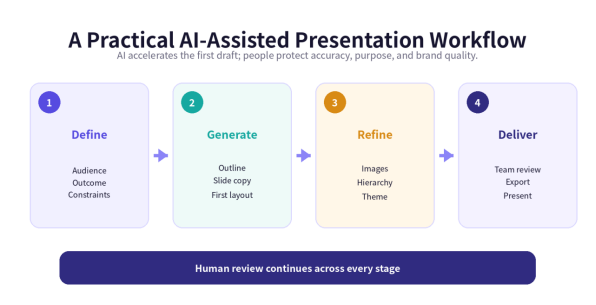
AI works best when it is part of a clear process. The following sequence keeps the speed advantage of automation while preserving editorial and design control.
Define the outcome. Identify the audience, the decision or takeaway, the speaking context, and any non-negotiable facts.
Choose the starting mode. Use a fixed template when content and brand structure are known; use AI generation when the story and slide plan still need development.
Generate the first draft. Ask for an outline and editable slides, then check whether the sequence supports the intended conclusion.
Improve the visual evidence. Search for better images, create a diagram, add a chart, or replace decorative visuals with information-bearing ones.
Apply the right theme. Test the deck in a suitable standard theme or apply custom brand colors, fonts, and logo rules.
Collaborate and revise. Invite reviewers to focus on claims, audience fit, design consistency, and the action the presentation should produce.
Export and rehearse. Confirm the delivery format, check the deck on the presentation device, and revise any slide that is difficult to explain aloud.
Image Search Without Leaving the Editor
Finding a usable image can take longer than writing the slide it supports. The usual workflow involves opening a stock library, downloading several options, returning to the presentation, uploading each file, and testing whether it fits the layout. Integrated image search removes much of that friction.
When search is built into the slide editor, the author can compare an image against the surrounding typography immediately. If it fails, it can be replaced before the design is overworked around a weak visual. Some tools also combine stock-image sources with local uploads and AI image generation, giving users several ways to find the right material without breaking their concentration.
Convenience should not replace judgment. Images still need to be relevant, appropriately licensed, high enough in resolution, and understandable to the intended audience. A beautiful photo that does not clarify the message is rarely the best choice.
Themes Provide Speed; Custom Themes Provide Control
Theme switching is one of the fastest ways to evaluate a presentation’s tone. The same content can feel formal, technical, energetic, or editorial depending on its typeface, color palette, spacing, and image treatment. A one-click theme change allows the author to test those directions without rebuilding every page.
Custom themes serve a different purpose. They turn brand decisions into reusable rules by defining approved colors, fonts, logos, and visual patterns. This is particularly valuable for organizations producing frequent proposals, reports, training decks, and marketing presentations. Instead of asking every contributor to remember the brand system, the workspace makes that system the default starting point.
Collaboration Turns One-Off Decks into a Repeatable System
Presentation work is often shared even when one person owns the file. A subject-matter expert checks the facts, a manager challenges the argument, a designer protects the brand, and a presenter adjusts the story for delivery. Team features make those handoffs easier when the deck, feedback, and visual rules live in the same environment.
Shared presentations, reusable team themes, and centralized account management can also reduce inconsistency across departments. The goal is not simply to let more people edit. It is to create a repeatable process in which every new deck begins with stronger content and design foundations.
What to Look for When Choosing an AI Presentation Tool
Before adopting a platform, test the full workflow rather than judging a single generated example.
Editable output: Can users change every slide after generation, or are they locked into a static result?
Visual quality: Does the tool vary layouts intelligently and connect images to the message?
Starting flexibility: Can a project begin from both a fixed template and an open-ended brief?
Image workflow: Are search, upload, replacement, and AI-generated images available inside the editor?
Brand controls: Can users switch themes quickly and create reusable custom or team themes?
Collaboration and export: Does the platform support the review process and the formats required for delivery?
A strong result in one category cannot compensate for a broken workflow elsewhere. For example, excellent copy generation is less useful if the slides are difficult to edit, while beautiful templates are limiting if every project requires manual content planning from the beginning.
A Practical Example: Bringing the Workflow Together with Gamma.onl
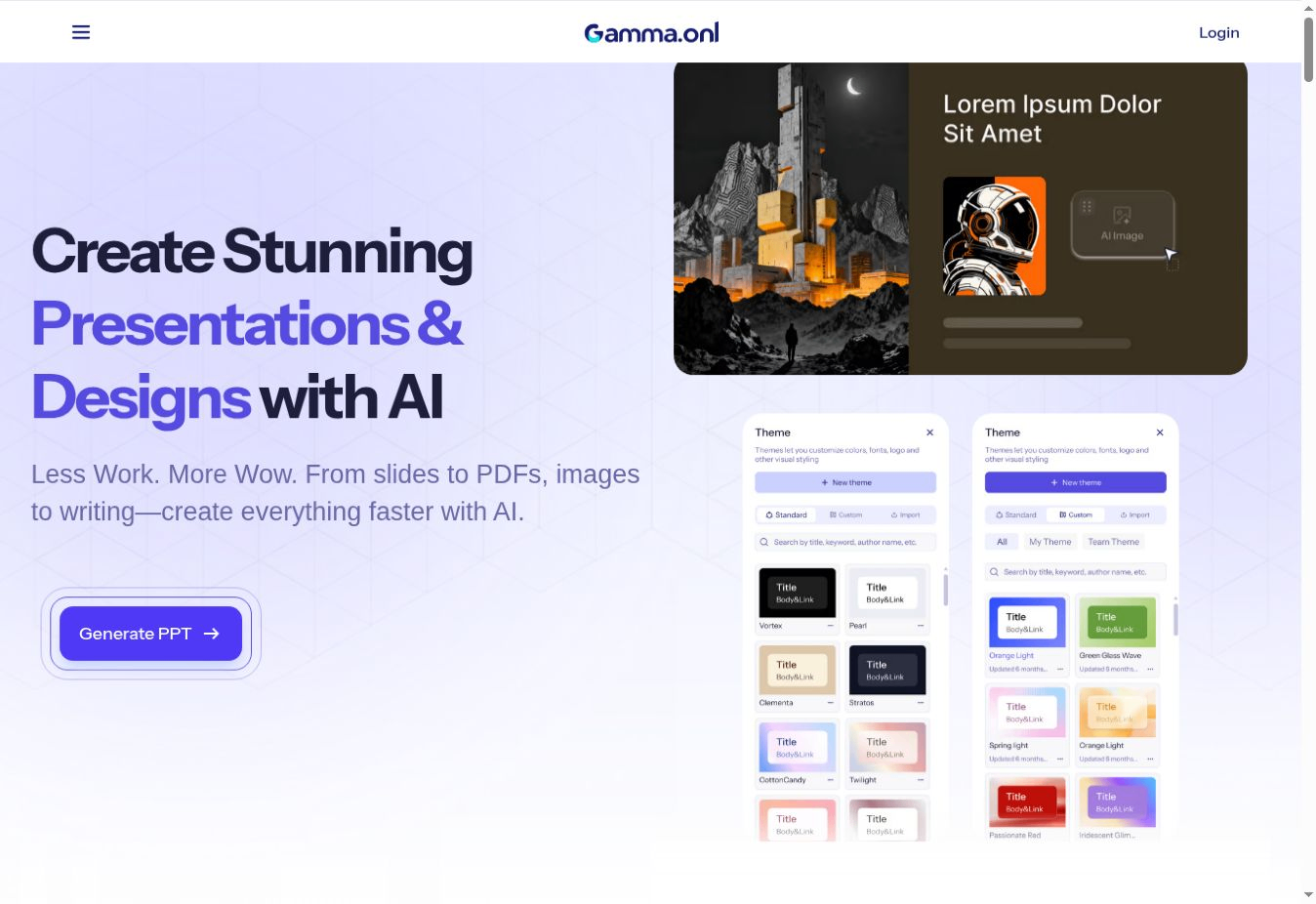
One example of this integrated approach is Gamma.onl. It supports both template-based creation and AI generation, so users can begin with an established visual system or ask AI to produce a complete editable presentation from a brief.
In its AI workflow, the platform can help organize an outline, draft page content, select or generate relevant images, and arrange the material into slide layouts. In its template workflow, users can work inside a pre-designed presentation system and replace the content while preserving a coordinated visual direction.
The editor also provides image search with sources currently including Unsplash and Pixabay, along with local uploads and AI image options. Standard themes can be changed quickly, while custom and team themes support repeated brand use. Team-oriented features include presentation sharing, team themes, and centralized billing, although exact access may depend on the selected plan.
Gamma.onl also offers adjacent AI tools for images, writing, chat, and PDF tasks. Those features are secondary to the presentation workflow, but they can reduce tool switching when a deck needs original visuals, revised copy, brainstorming, or information from an existing PDF.
Human Review Is Still the Final Quality Control
AI can remove repetitive work, but it cannot take responsibility for the presentation. Before delivery, a person should verify every factual claim, remove generic language, simplify crowded slides, confirm image rights, and make sure the deck reflects the organization’s actual position.
Review should also include accessibility and delivery conditions. Text needs sufficient contrast, charts need readable labels, essential information should not depend on color alone, and images should have useful descriptions when the file format supports them. Finally, the presenter should rehearse. A slide that looks polished but is difficult to explain is still unfinished.
Conclusion: A Better Starting Point, Not an Automatic Finish
The value of an AI presentation maker is not that it eliminates human creativity. It changes the starting point. Instead of facing an empty deck, users can begin with a proposed story, editable slide copy, relevant images, an initial layout, and a consistent theme.
Template-first creation remains the better choice when structure and brand rules are already established. Full AI generation is more useful when a project begins with only a topic, audience, or short brief. The strongest platforms support both paths and make it easy to move from generation to image refinement, theme control, team review, and delivery.
Used thoughtfully, AI does not make every presentation identical. It gives authors more time to focus on the decisions that make a presentation worth watching: what matters, what the audience needs, and how the story should be told.
Frequently Asked Questions
Can AI create a complete PowerPoint presentation?
Yes. A capable AI presentation maker can turn a brief into an editable deck with an outline, slide copy, images, and layouts. Human review is still needed for accuracy, emphasis, and final design quality.
Is it better to start from a template or generate a presentation with AI?
Use a template when the structure, content type, or brand direction is already known. Use full AI generation when the project needs help with both the storyline and the first visual draft.
Can AI presentation tools choose images and layouts?
Many modern tools can search for or generate relevant images and place content into suggested layouts. The best results still come from reviewing whether each visual genuinely supports the slide’s purpose.
Why are themes important in presentation design?
Themes apply consistent colors, fonts, spacing, and visual rules across the deck. Standard themes make experimentation faster, while custom and team themes help organizations protect their brand.
Are AI presentation makers useful for teams?
Yes. Shared presentations, reusable team themes, collaborative review, and centralized administration can make recurring presentation work faster and more consistent.