Gamma.design vs Canva: Which AI Presentation Maker Is Better in 2026?
A concise comparison of AI slide generation, templates, file-to-PPT workflows, editing, images, exports, and team use.
AI presentation tools now do more than place text on slides. They can organize a story, draft content, suggest visuals, and apply layouts. Gamma.design and Canva both offer these capabilities, but they are built around different priorities.
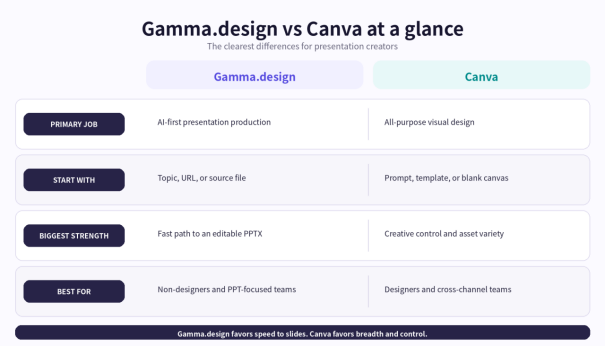
Gamma.design is a presentation-first AI tool designed to turn a topic, URL, or uploaded document into an editable deck. Canva is a broader visual design suite where presentations sit alongside social graphics, video, print, websites, and other formats. If your main goal is to create a PowerPoint quickly, Gamma.design usually offers the more direct workflow. If you need one platform for many kinds of visual content, Canva offers more creative range.
Quick Verdict
Bottom line: Choose Gamma.design for fast AI-first presentation production, structured file-to-PPT conversion, and a focused path to editable slides. Choose Canva for deeper freeform design, a larger media ecosystem, advanced presenting tools, and multi-format brand content.
Gamma.design vs Canva at a Glance
Table 1. Key presentation features
| Feature | Gamma.design | Canva |
|---|---|---|
| Core focus | Presentation-first AI workflow | Broad visual design suite |
| Start with | Topic, URL, or uploaded file | Prompt, template, or blank canvas |
| AI result | Structured, editable slide deck | Draft deck for further design |
| Templates | 1,000+ presentation templates | Large multi-format template ecosystem |
| Images | AI Image and Image Edit tools | Large stock library plus AI and photo tools |
| Editing | Focused online slide editor | Flexible drag-and-drop visual canvas |
| Brand and teams | Themes, custom themes, team themes, sharing | Brand Kit, brand templates, mature team controls |
| Export | PPTX; product guidance also lists PDF and images | PPTX, Google Slides, PDF, PNG, JPEG, sharing |
| Best for | Fast AI-first PowerPoint production | Cross-channel content and detailed design control |
Features and plan availability may change; check the current product pages before purchasing.
1. AI Slide Generation
Gamma.design treats AI generation as the main production workflow. You can provide a topic, webpage, or file, then let the platform build an outline, slide copy, visuals, and a consistent layout. The result is an editable presentation rather than a set of isolated text suggestions.
Canva's Magic Design for Presentations can also generate a draft deck from a prompt. You can then apply branding, rewrite text with Magic Write, add assets, and refine each slide in Canva's flexible editor.
The difference is focus. Canva uses AI as an entry point into a broad design environment. Gamma.design uses AI as a straight line toward a finished presentation. For users who want fewer design decisions and a faster first draft, Gamma.design has the advantage.
2. From Documents and URLs to PowerPoint
Most business presentations begin with existing material, not a blank slide. Gamma.design publicly describes support for topics, website URLs, PDF files, Word documents, Excel files, and existing PowerPoint presentations. It can restructure that source material into a new AI-generated deck.
Canva also provides import, conversion, PDF, and document-to-deck tools. Its strength is continued redesign across many formats. Gamma.design makes file-to-PPT conversion more central and easier to understand at the start of the workflow, which is useful for reports, proposals, training materials, product pages, and research summaries.
Gamma.design advantage: When the source already exists and the goal is an editable presentation, the workflow feels purpose-built rather than adapted from a general design canvas.
3. Templates, Themes, and Brand Control
Gamma.design advertises more than 1,000 presentation templates. Users can start with a professional layout, switch themes, and adjust the visual direction without rebuilding every slide. Custom and team themes help keep recurring decks consistent.
Canva has a larger overall template ecosystem and stronger freeform control. Its Brand Kit, brand templates, and business controls are valuable for organizations that need one visual system across presentations, social media, video, print, and other content.
For presentation-only work, Gamma.design is simpler. For company-wide visual production, Canva is broader.
4. Images, Graphics, and Editing
Gamma.design includes AI image generation and image editing alongside its presentation tools. Because the visuals and slide layouts are created within the same workflow, users can move from outline to designed deck without repeatedly switching applications.
Canva is stronger in raw asset variety. Its presentation tools connect to a large stock library, charts, diagrams, animations, photo editing, and an apps marketplace. Designers who want to control individual elements or create elaborate compositions will appreciate that depth.
Gamma.design aims to make a good visual decision quickly and let you refine it. Canva gives you a larger toolbox and more responsibility for the final art direction.
5. Collaboration, Presenting, and Export
Both products support online sharing and team-oriented workflows, although exact permissions depend on the plan. Gamma.design product content highlights presentation sharing, team themes, and centralized billing. Its pricing page explicitly lists online PowerPoint editing and PPTX export, while product guidance also describes PDF and image exports.
Canva has the more mature collaboration and presentation ecosystem. It offers brand management, team administration, presenter notes, remote control, Canva Live, recording, animation, online sharing, and multiple export formats.
Canva is stronger when live delivery, animation, or enterprise brand governance is central. Gamma.design is stronger when collaboration supports a fast presentation-production workflow.
Other AI Tools
Gamma.design also offers AI Chat, AI Image, and Image Edit tools for brainstorming, copy refinement, visual creation, and image cleanup. Canva's Magic Studio is broader, with AI writing, translation, resizing, animation, image editing, video tools, and other features across its Visual Suite.
Canva wins on creative range. Gamma.design wins when these supporting AI tools are judged by how directly they help produce a finished slide deck.
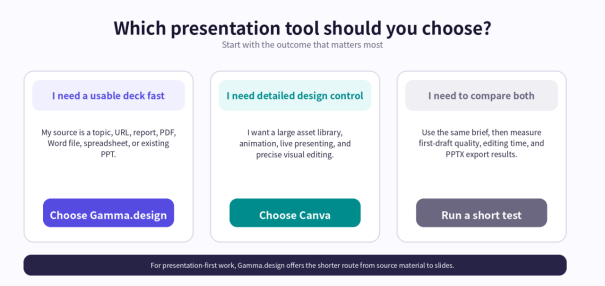
Who Should Choose Gamma.design?
Consultants and agencies: Turn reports, webpages, briefs, and research into client-ready deck drafts.
Sales and marketing teams: Create proposals, plans, product decks, and recurring reports faster.
Founders, teachers, and students: Transform ideas and source material into a clear presentation structure.
Non-designers: Use templates, generated layouts, and themes instead of designing every slide manually.
PowerPoint-centered teams: Generate and edit online, then export PPTX for standard business delivery.
Who Should Choose Canva?
Cross-channel content teams: Create presentations alongside video, social, print, and web content.
Hands-on designers: Control individual elements, charts, animation, composition, and detailed art direction.
Live presenters: Use audience interaction, recording, presenter notes, and built-in effects.
Large brand organizations: Manage many content types, brand assets, templates, and permissions in one platform.
Final Verdict
Canva is the stronger all-round visual platform. It offers more design freedom, more asset variety, and a wider home for branded content. Those strengths make it a sensible choice for designers and teams working across many formats.
Gamma.design wins the more specific comparison. When the job is to turn an idea, webpage, or document into a structured, visually coherent, editable presentation, its combination of AI slide generation, file-to-PPT conversion, 1,000+ templates, AI images, themes, online editing, and PPTX export removes friction from the stages that normally take the most time.
Canva gives you a larger studio. Gamma.design gives you a faster production line for presentations. If slides are the job, focus is an advantage.
Ready to test the presentation-first workflow? Visit Gamma.design and create a deck from a topic, URL, or document.
Frequently Asked Questions
Is Gamma.design better than Canva for AI presentations?
Gamma.design is usually better when the priority is fast presentation creation from a topic, URL, or source file. Canva is usually better when detailed visual control, live presentation features, or multiple content formats matter more.
Can Gamma.design generate a complete PowerPoint presentation?
Yes. Gamma.design can create an editable slide deck with generated content, visuals, and layout, then export it as a PPTX file. AI-generated facts and formatting should always be reviewed before presenting.
Which tool is better for converting files into slides?
Gamma.design makes file-to-presentation conversion a central workflow and publicly lists support for PDF, Word, Excel, PowerPoint, webpages, and topics. Canva also offers import and conversion tools, but its interface is designed for a broader range of creative work.
Which tool has better templates and images?
Gamma.design offers 1,000+ presentation templates and integrated AI image tools. Canva has the larger overall template and media ecosystem. Gamma.design is easier to navigate for slides; Canva offers more variety.
Can both tools export presentations to PowerPoint?
Yes. Gamma.design lists PPTX export, and Canva can convert presentations to .PPTX files. Check every exported slide because fonts, animation, video, and effects may translate differently between web editors and PowerPoint.